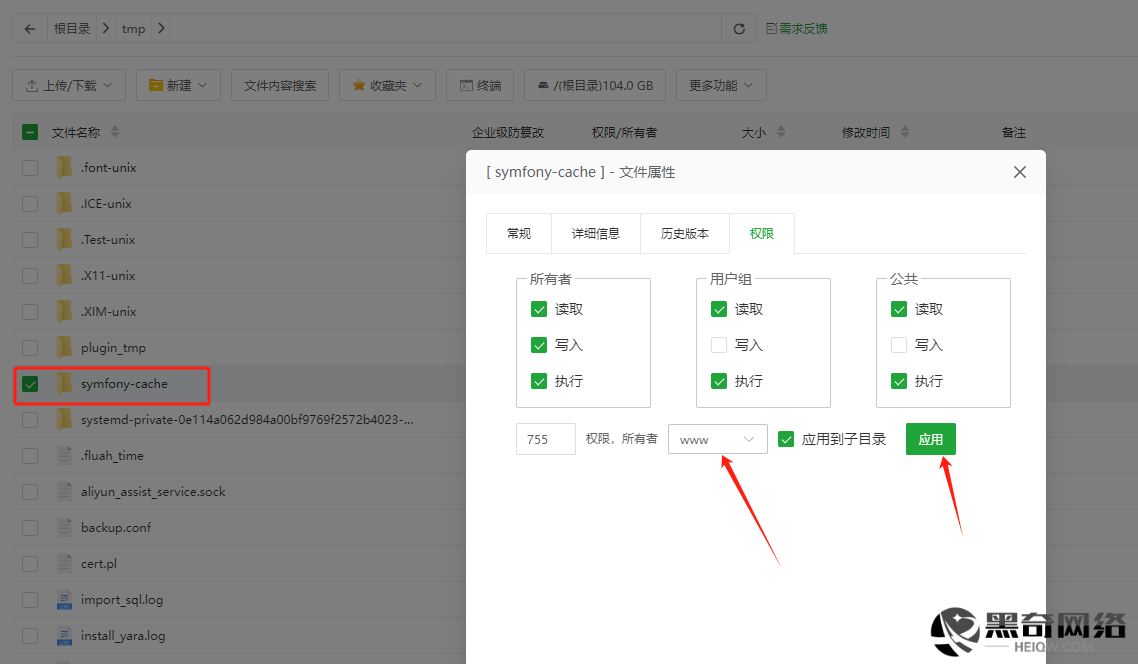
解决报错:EasyWeChat\Kernel\Exceptions\RuntimeException Failed to cache access token.
1. in /www/wwwroot/xxx.cn/vendor/overtrue/wechat/src/Kernel/AccessToken.php at line 143
134135136137138139140141142143144145146147148149150151152
     */
    public function setToken(string $token, int $lifetime = 7200): AccessTokenInterface
    {
        $this->getCache()->set($this->getCacheKey(), [
            $this->tokenKey => $token,
            'expires_in' => $lifetime,
        ], $lifetime - $this->safeSeconds);

        if (!$this->getCache()->has($this->getCacheKey())) {
            throw new RuntimeException('Failed to cache access token.');
        }

        return $this;
    }

    /**
     * @return \EasyWeChat\Kernel\Contracts\AccessTokenInterface
     *
     * @throws \EasyWeChat\Kernel\Exceptions\HttpException
2. in /www/wwwroot/xxx.cn/vendor/overtrue/wechat/src/Kernel/AccessToken.php at line 121 –
解决办法
把/tmp/symfony-cache路径的所有者改成www并且权限弄成755,宝塔面板里修改也就是图片默认直接点保存就行